
Family and Medical Leave Act (FMLA)
2026 Updates
As of January 1, 2026, the administrator for FMLA is Reliance Matrix which offers streamlined claims processing and expanded online tools.
The benefits did not change. There will be no disruption to leave that extends into 2026. If you are on approved FMLA leave, the information from UnitedHealthcare has been transferred to Reliance Matrix allowing for a seamless transition.
The Family and Medical Leave Act (FMLA) allows eligible employees to balance their work and family life by taking up to 12 weeks of continuous or intermittent unpaid leave for certain family or medical reasons.
FMLA administration services are provided by Reliance Matrix.
Overview
Who's eligible for FMLA?
FMLA provides a guarantee of job security and continuation of employee benefits during the approved leave for a maximum of 12 weeks per rolling 12-month look-back period. To be eligible for FMLA, the employee must:
- Have been employed by Pinellas County for at least 12 months (does not have to be consecutive), and
- Have worked at least 1,250 hours during the 12 months immediately preceding the commencement of the leave.
When can an employee use FMLA?
Eligible employees may be entitled to up to 12 weeks of scheduled, unpaid leave for continuous or intermittent absences for any of the following reasons:
- Pregnancy, prenatal care, bonding or placement of a child for adoption or foster care
- Your own serious health condition*
- To provide care for a qualifying family member with a serious health condition*
- Service member family leave (up to 26 weeks in a 12-month period)
- Qualifying military exigency
*Serious health condition means an illness, injury, impairment, or a physical or mental condition that involves inpatient care or continuing treatment by a healthcare provider. For details, see the FMLA Handbook, page 5.
How is an employee's leave time calculated for FMLA?
The FMLA calculation is based on a 12-month rolling look-back period, not a calendar year. For example, John applies for FMLA in February 2025 and is entitled to 12 weeks in a rolling 12-month period. John took 4 weeks of FMLA time in August 2024, so he has 8 weeks remaining until the clock resets in August 2025.
How does an employee get paid during FMLA leave?
- The employee must use accumulated annual leave for FMLA absences if their annual leave bank contains more than 40 hours.
- Personal days, floating holidays and comp time may be used as well.
- Once all other available hours have been depleted, including short-term disability, an employee who qualifies for donated hours through AFIN (A Friend in Need) may use such hours if available.
What happens to the employee’s medical benefits while they are on leave?
Employees are responsible for paying the employee portion of medical premiums if they wish to continue such coverage. Failure to do so may result in termination of coverage.
If an employee is using paid leave time or short-term disability benefits, the medical premiums will be deducted from those earnings.
If an employee is on unpaid leave, they need to arrange payment by contacting their payroll representative as follows:
- Employees of the Board of County Commissioners, Business Technology Services, Clerk of the Circuit Court & Comptroller, County Attorney, Human Resources, Office of Human Rights: Contact Payroll by email at payroll@mypinellasclerk.org or call (727) 464-8392.
- Employees of Forward Pinellas, Property Appraiser, Supervisor of Elections, and Tax Collector: Call your department’s payroll contact.
What is the difference between continuous and intermittent FMLA leave time?
Continuous FMLA is leave that is taken and not broken up by periods of work, usually for absences more than 3 consecutive workdays.
Intermittent or reduced schedule FMLA is more flexible and allows an eligible employee to take leave in separate blocks of time. Conditions must be recertified every 6 months. The supervisor maintains an open dialogue with the employee on departmental call-in procedures and work expectations. IMPORTANT: The employee must contact Reliance Matrix within 48 hours of returning from an intermittent absence to have the dates approved under FMLA.

Contact Reliance Matrix
- Website: www.matrixabsence.com
- App: Reliance Matrix
- Phone: (877) 202-0055, available 24/7

Learn what leave time is available to an employee who gives birth including FMLA and short-term disability.
FMLA Process
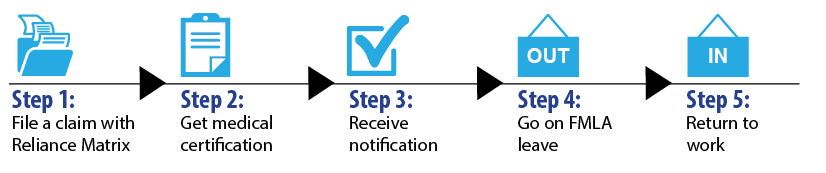
Step 1: FMLA Request
How does an employee request FMLA leave?
You need to submit a leave request and file a claim as shown below:
- Submit a leave request to your supervisor in EBS (OPUS).
- File a claim with Reliance Matrix 24 hours a day, 7 days a week. You choose the method: online, mobile app, or phone:
- Online or app: Go to matrixabsence.com or download the Reliance Matrix mobile app.
- If you are a first-time user, select Create Account, and create your username and password.
- Your personal email address is recommended for your username.
- Selecting the option to sign up for text updates is recommended to stay informed of every step of the process.
- Phone: Call (877) 202-0055.
- Online or app: Go to matrixabsence.com or download the Reliance Matrix mobile app.
You should complete these steps at least 30 days before the leave begins.
If advance notice is not possible, call Reliance Matrix and submit a leave request as soon as possible. In case of emergency, the employee’s family member should contact their supervisor and Reliance Matrix as soon as possible.
Step 2: Medical Certification
How does the employee receive medical certification?
- Within 24 hours of requesting leave, you will receive an absence packet from Reliance Matrix including a Medical Authorization form for you to sign and submit as soon as possible.
- Reliance Matrix will also send the absence packet to your physician.
- Reliance Matrix will notify you when they receive the completed medical certification packet from your physician.
- You have 15 days to ensure the physician completes the packet and submits it to Reliance Matrix for review or the claim will be denied.
Step 3: FMLA Notification
How does Reliance Matrix send notification of the claim decision?
- Upon receipt of the physician paperwork, Reliance Matrix has up to 5 business days to process the claim and provide notification of the results:
- Approval
- Denial
- Incomplete (request for more information)
- Reliance Matrix will email the leave determination notice to Employee Benefits and the employee’s direct supervisor.
- Reliance Matrix will notify the employee by letter, mobile phone, and email (if your phone number and/or email address is on file).
Contact Employee Benefits by phone at (727) 464-3367, option 1, or by email if you do not receive notification from Reliance Matrix in a timely manner.
Step 4: FMLA Leave / Supervisor Completes Timecard
What is the employee's responsibility while on FMLA leave?
- Keep your supervisor informed of your leave status.
- You should submit the leave request before going on FMLA, but if you need additional time, notify your supervisor and submit an additional leave request using EBS (OPUS).
What is the supervisor’s responsibility while the employee is on FMLA leave?
- Advise the employee to provide status updates.
- Complete the employee’s timecard.
- Review Reliance Matrix and Employee Benefits’ emails and provide requested information, as needed.
How does a supervisor code their employee’s timecard while they are on FMLA leave?
- FMLA has been approved:
Code timecard as FMLA Annual Leave (FMLA AL), FMLA Leave Without Pay (FMLA LWOP), or A Friend in Need Hours (FMLA AFIN Hours) only if all other available leave is exhausted). - FMLA is pending approval:
Code timecard as Annual Leave (AL) or Leave Without Pay (LWOP). Once FMLA is approved, timecards can be retroactively corrected. - FMLA and short-term disability (STD) has been approved:
Code timecard according to the guidance above. Payroll will split timecard appropriately between STD and AL or LWOP, upon receipt of payment advice from Employee Benefits.
Accumulated annual leave must be used for FMLA absences if an employee has more than 40 hours in their leave bank. Personal days, floating holidays and comp time may be used as well. Once all other available leave, including short-term disability, has been exhausted, A Friend in Need donated hours may be used.
How does an employee report intermittent absences?
To report intermittent absences to Reliance Matrix, use one of the methods shown below (web, mobile, or phone). For special situations, adjustments, or corrections, please contact Reliance Matrix customer service at (877) 202-0055.
Reporting Absences: Web Portal
- Login to Matrix eServices.
- Select the option to Report Intermittent Absence.
- From the list of leaves, select the leave you are reporting time against.
- Enter the Start Date and End Date of your absence.
- Enter the Total Time Off for that day. For example, 2 hours off in the morning and 1 hour in the afternoon is entered as a total of 3 hours off.
- Save the entry and record the System Confirmation Number for future reference.
Report Absences: Mobile App
- Log in to the Matrix eServices mobile app on your smartphone or table.
- Select the appropriate claim to report intermittent time.
- From the list of leaves, select the leave you are reporting time against.
- Select the option to Report Intermittent Absence.
- Enter the Start Date and End Date of your absence.
- Enter the Total Time Off for that day. For example, 2 hours off in the morning and 1 hour in the afternoon is entered as a total of 3 hours off.
- Save the entry and record the System Confirmation Number for future reference.
Reporting Absences: Phone
- Call the automated Reliance Matrix Interactive Voice Response (IVR) line at (888) 477-5110.
- Identify yourself by providing your date of birth and the last four (4) digits of your Social Security number.
- Select the option to report Intermittent Time Off.
- Select the leave you are reporting this time against.
- Enter the Start Date and End Date of your absence.
- Enter the Start Time of your absence.
- Enter the Total Time Off for that day. For example, 2 hours off in the morning and 1 hour in the afternoon is entered as a total of 3 hours off.
- Save the entry and record the System Confirmation Number for future reference.
If you have questions, please contact Reliance Matrix customer service at (877) 202-0055, available 24 hours a day, 7 days a week.
Can a supervisor contact the employee for work-related needs while on FMLA?
No. If a supervisor contacts the employee and asks them to perform work duties, they will need to compensate their time.
Can a supervisor contact the employee's doctor for additional information?
No. Reliance Matrix is responsible for receiving medical information. The supervisor may contact Employee Benefits for updates on the leave.
Step 5: Return to Work
How does a supervisor know when the employee is returning to work?
The Reliance Matrix FMLA approval notice will list the final date for which the FMLA is approved. The employee would be expected to return to work on the next following business day or notify their supervisor if they have applied for an extension of leave through Reliance Matrix. Supervisors also have access to the Absence Radar portal which provides real-time visibility into employee absences.
What happens if the employee does not return to work?
If an employee fails to return to work at the expiration of their approved FMLA leave, they may be treated as having voluntarily resigned after 3 days unless a leave of absence is granted by their Appointing Authority.
What if the employee needs additional time for FMLA?
If FMLA is still available, the employee should contact Reliance Matrix to request an extension of the leave.
If the employee has restrictions, what should a supervisor do?
Contact the County Attorney’s Office to discuss the restrictions if they impact the employee’s essential job functions.
3/11/26